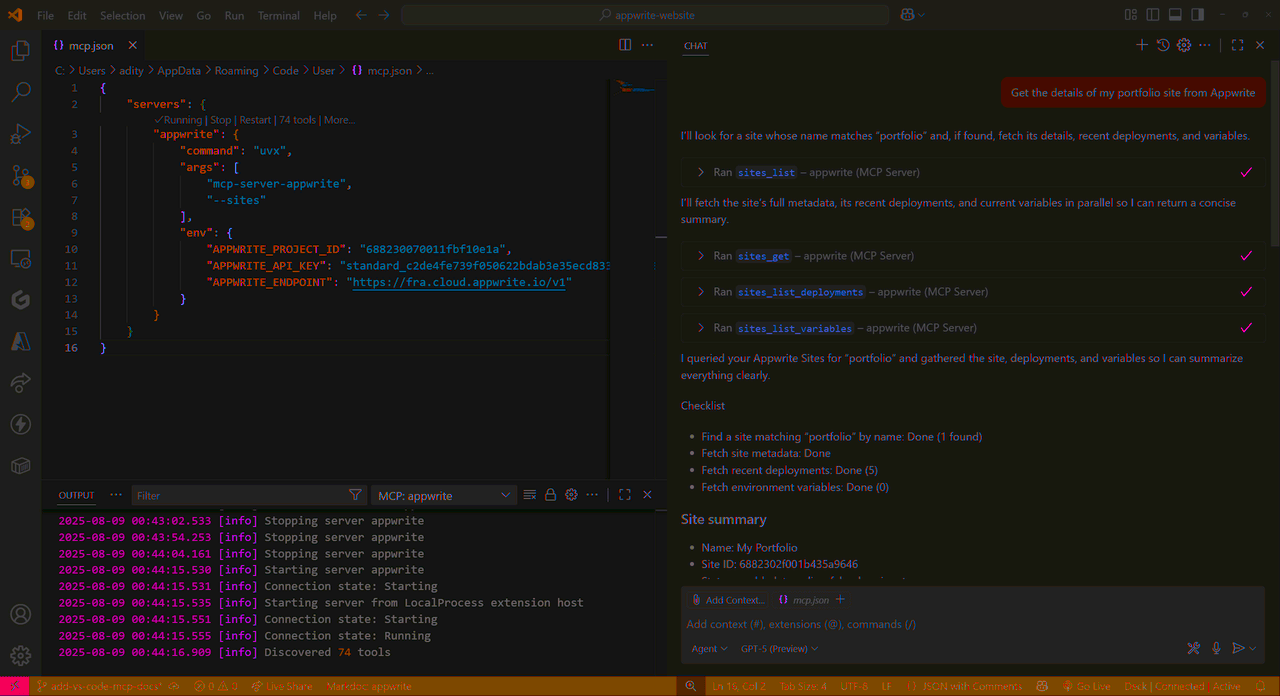
Learn how you can add the indobase MCP servers to GitHub Copilot Chat in VS Code to interact with both the indobase API and documentation.
Before you begin, ensure you have the following pre-requisites installed on your system:
In VS Code, open the Command Palette (press CTRL + Shift + P on Windows or CMD + Shift + P on MacOS) and run the MCP: Open User Configuration command.
Choose which MCP servers you want to configure:
Update the mcp.json file to include the API server:
{
  "servers": {
    "indobase-api": {
      "command": "uvx",
      "args": [
        "mcp-server-appwrite",
        "--sites"
      ],
      "env": {
        "APPWRITE_PROJECT_ID": "your-project-id",
        "APPWRITE_API_KEY": "your-api-key",
        "APPWRITE_ENDPOINT": "https://<REGION>.cloud.indobase.io/v1"
      }
    }
  }
}
Configuration:
- Replace
your-project-idwith your actual indobase project ID - Replace
your-api-keywith your indobase API key - Replace
<REGION>with your indobase Cloud region (e.g.,nyc,fra)
Update the mcp.json file to include the docs server:
{
  "servers": {
    "indobase-docs": {
      "url": "https://mcp-for-docs.indobase.io",
      "type": "http"
    }
  }
}
Once you save the configuration, Copilot Chat will connect with the MCP server(s) and load all available tools.
Enable other API MCP tools
To enable additional API tools, learn more about command-line arguments.
Open Copilot Chat in VS Code and switch to Agent Mode to test your MCP integrations. You can try out the following example prompts based on the MCP server you have configured:
Example prompts:
Create a new user in my indobase projectList all databases in my projectShow me the collections in my databaseCreate a new document in my collectionDelete a specific user by ID
Example prompts:
How do I set up real-time subscriptions in indobase?Show me how to authenticate users with OAuthWhat are the best practices for database queries?How do I implement file uploads with indobase Storage?Show me an example of using indobase Functions